



%402x.svg)


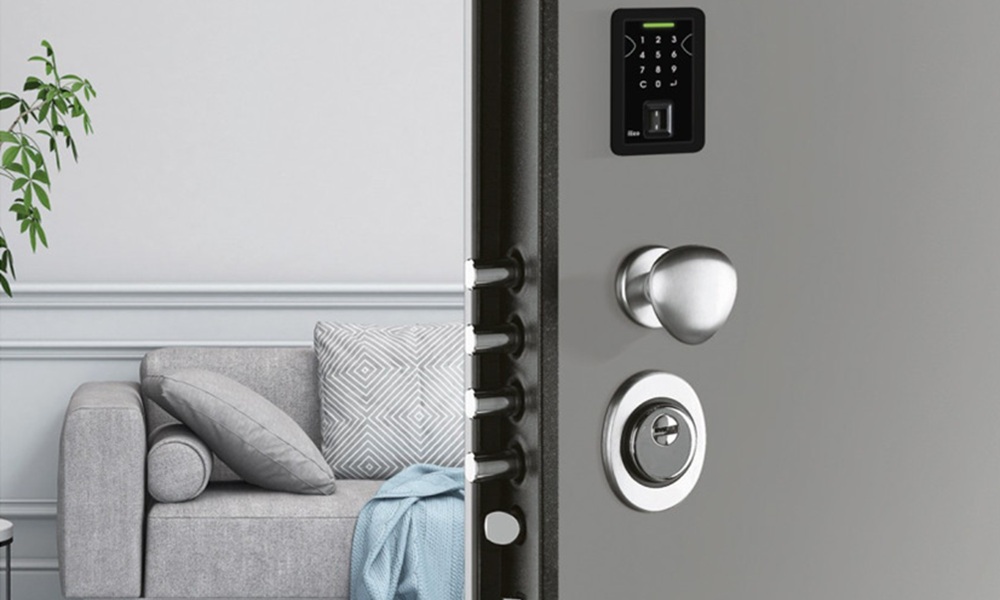
Smart home kits have come a long way, and the humble door lock is no exception. A smart door lock can make day-to-day access easier (no more key hunts on the driveway), and it can add useful security features like audit trails and auto-locking. But it also introduces new questions: how do smart door locks work, what happens when the battery dies, and how secure are smart door locks compared to a traditional mechanical setup?
Below is a clear, practical guide to help you decide whether smart door locks make sense for your property, especially if you’re considering a smart lock front door upgrade.
What is a Smart Door Lock?
So, what is a smart door lock in plain terms? It’s a lock that lets you lock and unlock a door using electronic authentication rather than only a physical key. Depending on the model, that might mean:
- A keypad code (PIN)
- A phone app (Bluetooth and/or Wi-Fi)
- A fob or card
- Fingerprint/biometrics
- Remote “virtual keys” you can issue and revoke
Some smart locks replace the whole lockcase or handle set, while others retrofit onto an existing cylinder or deadbolt-style mechanism. Many also include mechanical backup access (like a key override) for peace of mind.
How Do Smart Door Locks Work?
The key idea is this: you still have a physical locking mechanism, but the “permission to unlock” is managed electronically.
In practice, the lock checks a credential (your code, fingerprint, phone, or authorised app account). If it matches, a small motor or actuator turns the mechanism, retracting the latch or deadbolt. Some models connect to a hub or your home network, which can enable:
- Remote locking/unlocking
- Activity logs (who came in and when)
- Temporary access codes for guests or tradespeople
- Integration with alarms, cameras, and smart home routines
Powering And Maintaining Smart Locks
A smart lock only stays smart if it stays powered, so maintenance matters.
Typical power options
- Battery-powered (common in domestic smart locks): usually AA/AAA or a rechargeable pack
- Hardwired (more typical in high-security or access control setups): powered via fixed wiring, often with a backup strategy in place
At Stronghold, our motorised lock solutions are hardwired using 12V cabling, rather than relying on batteries. That’s helpful for long-term reliability and for integrations where consistent power matters (for example, linking access control to wider automation).
Practical maintenance tips
- If you’re battery-powered, replace batteries proactively (don’t wait for the last warning)
- Keep firmware and the companion app updated where applicable
- Use strong account security (unique passwords, MFA if offered)
- Check that your door is aligned and shuts cleanly, so the mechanism isn’t straining to engage
Most reputable systems provide low-power warnings and a backup method (for example, manual override) so you’re not locked out if something goes wrong.
How Secure are Smart Door Locks?
The honest answer is: it depends on the model, how it’s installed, and the door it’s fitted to.
Where smart locks can be stronger than traditional locks
- Harder to pick: Many smart locks remove the traditional keyway entirely, which can reduce classic picking attacks. Some also lock out after multiple incorrect code attempts.
- Better access control: You can revoke access instantly (useful for short-term visitors, staff, or after losing a phone/fob)
- Visibility: Activity logs can highlight unusual patterns
Where smart locks can be weaker
- Connectivity risk: Any connected device can be misconfigured (weak passwords, outdated firmware, insecure home Wi-Fi)
- Physical attacks still apply: If the lock or cylinder is weak, or the door/frame is vulnerable, a thief may simply force entry rather than “hack” anything
- Poor installation: Misalignment, incorrect fitting, or using a smart lock on an unsuitable door can undermine the whole system
A useful way to cut through marketing is to look for independent testing and approval schemes. In the UK, Sold Secure has introduced a smart lock specification (SS504) aimed at assessing both physical resistance and IoT security considerations.
Advantages And Disadvantages Of A Smart Door Lock
If you’re weighing up the advantages and disadvantages of smart door lock options, here’s the grounded view.
Benefits of smart door lock (the real-world wins)
- Convenience without “spare key” risk: You can grant time-limited access without hiding keys under pots or handing out copies
- Control and flexibility: Issue and revoke access quickly (great for dog walkers, cleaners, holiday lets, or busy households)
- Auto-locking and alerts: Some systems can re-lock after a set time or notify you if the door is left unlocked
- Audit trail: Seeing entries/exits can be genuinely helpful for families, small offices, or serviced accommodation
Concerns about smart door locks (what to watch)
- Battery dependence (for some models): a flat battery is avoidable, but it’s still a factor on many consumer smart locks
- Account and network security: if your email, lock account, or Wi-Fi security is poor, you’re inviting trouble
- Compatibility: not every door, multipoint system, or handle set is a good fit for a retrofit lock
- Overconfidence: a smart lock can be a good layer, but it’s not a substitute for strong physical security
A Stronghold Approach: Motorised, Hardwired Locking With Smart Integrations
Not all “smart locks” are built the same way. Some are designed as standalone, battery-powered products for typical domestic doors. Stronghold can also support a more integrated route: a motorised electromechanical lock that’s hardwired (12V) and designed to work as part of a broader access and security setup.
This matters because a motorised lock can be wired to connect with AV systems and smart home / building automation, and it can be controlled through multiple access methods (for example, biometric, keypad, RFID, and app-based control), depending on what you choose to integrate.
x1R Smart: The Motorised Lock Mechanism
The x1R Smart is an advanced electromechanical locking motor used for doors in high-security or automated setups. It provides motorised locking and unlocking, supports both single- and multi-point locks, and is designed to integrate with access control systems. It has no on-door hardware of its own - it focuses on the motorised locking function and connects to approved control options such as biometric readers or wider automation.
What this adds on a security door
- Seamless automation - lock/unlock remotely or via smart triggers (fingerprint, keypad, RFID, smartphone app).
- High security - motor-driven locking helps ensure bolts fully engage with precision for consistent, reliable security.
- Multiple access options - integrates with biometric readers, code pads, or access cards for flexible use in homes or businesses.
- Quiet and smooth operation - a professional-grade motor mechanism can reduce wear and noise.
- Failsafe and manual override - a sensible route to continued operation in the event of a power issue.
- Smart home integration - connect into wider building automation for status checks, alerts, and remote management.
- Customisable settings - adjust locking times, access levels, and triggers to suit your day-to-day routine.
eKey: Biometric Fingerprint Access
The eKey system is a premium biometric access solution that uses fingerprint recognition for secure, convenient entry. It replaces traditional keys with unique biometric identification, so only authorised individuals can gain access. It can be integrated into security doors and connected to smart home environments, with app-based remote management and access logs.
What this adds on a security door:
- Top-level security - fingerprint access helps reduce the risks that come with lost or copied keys.
- Convenience - no need to carry keys or remember codes; access is instant with a fingerprint scan.
- App control - add or remove users, view access logs, and manage permissions remotely.
- Customisable permissions - assign different access rights to family, staff, or service providers, including time-based restrictions.
- Integration ready - works with smart home and building automation systems for a connected security setup.
- Elegant design - modern, discreet readers that suit premium security door aesthetics.
- Weather and wear resistant - built for durability in real-world conditions.
Choosing Smart Door Locks for Your Front Door: What to Prioritise
If you’re shopping for smart door locks for your front door, don’t just start with features. Start with fundamentals:
- Physical strength first: Look for independent testing and robust build quality. If a product references recognised standards or third-party approvals, that’s a better sign than vague “military-grade” claims.
- Match the lock to the door type: Multipoint locking doors, composites, timber, and metal doors can all have different requirements.
- Secure setup: Use a strong, unique password, enable MFA where possible, and keep firmware updated.
- Think in layers: A smart lock is only one part of the entry system. A weak door leaf, flimsy frame, or poor installation creates easy opportunities.
If you’re investing in a smart lock front door setup, it’s worth thinking about the door itself at the same time. A robust security door and frame, combined with a well-chosen lock, is a far stronger proposition than upgrading electronics on a vulnerable entry point.
Final Thoughts: Are Smart Locks Worth It?
A good smart lock can be a solid upgrade when it’s chosen carefully, installed properly, and supported by good home cyber hygiene. It can also be a headache when it’s bought for features alone, fitted to the wrong door, or treated like a magic shield against burglary.
If you’d like practical advice on strengthening your front entrance as a complete system (door, frame, locking, and access control), Stronghold can help you choose a setup that fits your property and risk level. Explore our security door options or speak to us about your requirements.
